
Saving and opening projects
Saving
Section titled “Saving”Tap SAVE PROJECT in Step 2. It saves the whole project: every grid’s alignment and settings, masks, and Warp Paint.
- When there are changes you haven’t saved, the button is lit and “You have unsaved changes!” shows under it.
- After saving, the button dims and a brief “saved” message appears.
- SAVE + CONTINUE in Step 1 also saves.
Reopening
Section titled “Reopening”- LOAD LATEST on the Main menu opens the project you saved most recently.
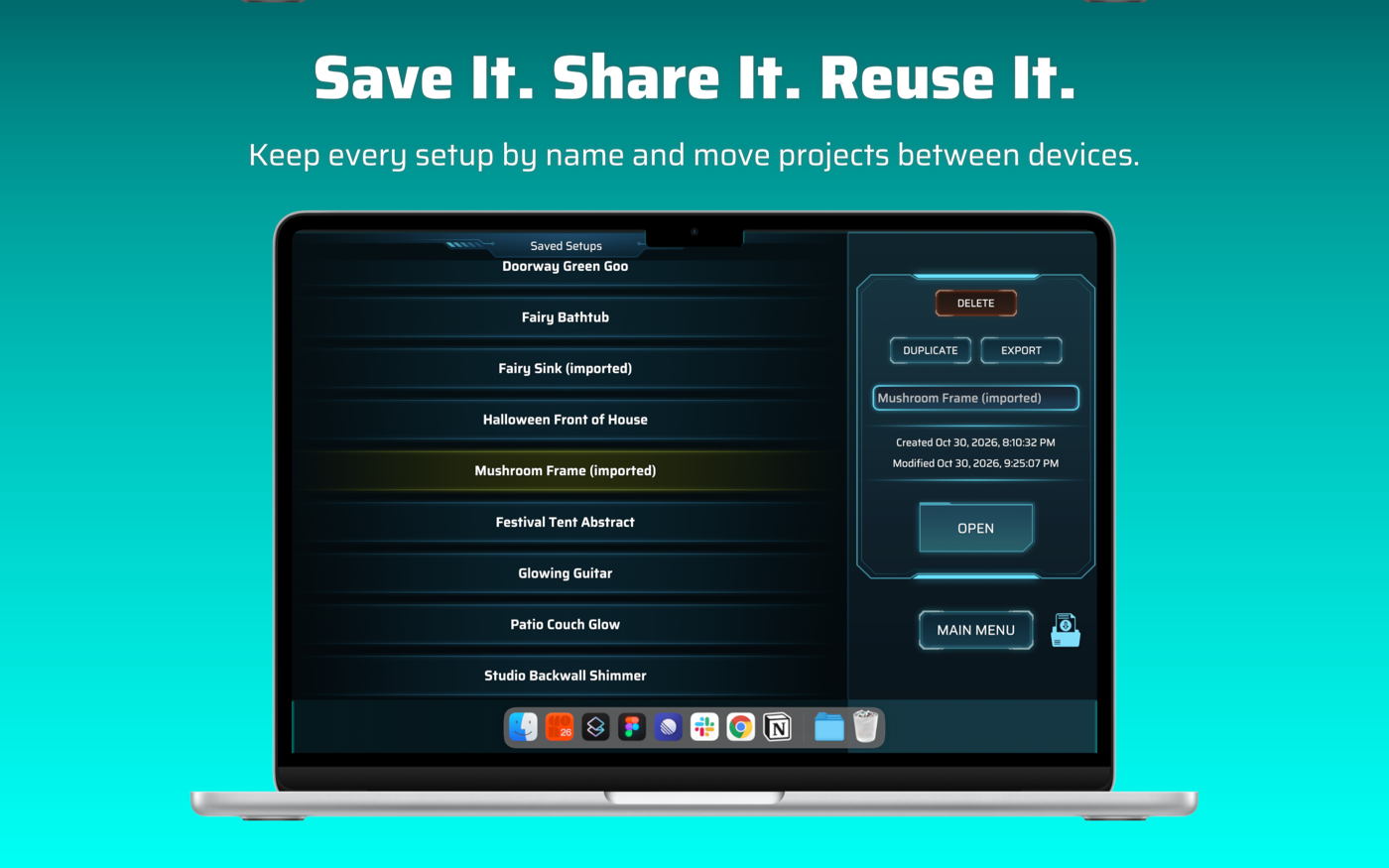
- SAVED PROJECTS lists every project.
The Saved Projects screen
Section titled “The Saved Projects screen”Tap a project in the list to select it. The panel on the right shows when it was created and last modified.
| Control | What it does |
|---|---|
| Name box | Rename the project. |
| OPEN | Opens the project. |
| DUPLICATE | Makes a copy to experiment on. |
| EXPORT | Saves a small .ilwj file you can share or move to another device. See Export and import. |
| DELETE | Deletes the project. |
| Import icon (bottom right) | Makes a new project from a .ilwj file. |
| MAIN MENU | Back to the Main menu. |